
When building a Kotlin/Multiplatform library for iOS, the documentation and most examples show how to build for either x86 or ARM64. However, what if you'd actually want to use your library both on iPhone devices as well as the iOS Simulator. Here's how to build a fat framework with plain Gradle. In this article, we'll … Continue reading Kotlin/Multiplatform Fat Framework for iOS
Android library publication in 2020
Using Gradle 6, Kotlin DSL and Dokka. Many guides and how-to's about publishing Android libraries use outdated information. While the (deprecated) Gradle maven plugin, bintray or artifactory plugins continue to work just fine, things look a little different when using Gradle Kotlin DSL. Also, when creating Android libraries written in Kotlin, code documentation should use … Continue reading Android library publication in 2020
Sunspot photography on April 21st, 2018
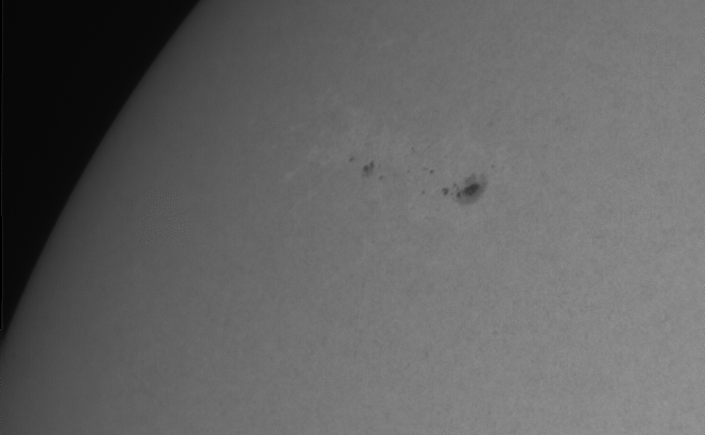
Even though we're approaching the minimum of the current solar cycle, occasional sunspots still appear. The image was taken on 21st of April, 2018 using a Skyris 132M Camera using Baader Solar Continuum filter through an Edge HD 8''. This was the best shot out of a serious of 35 captures taken with FireCapture and … Continue reading Sunspot photography on April 21st, 2018
Alpha+ Player – Unofficial player for Soma FM
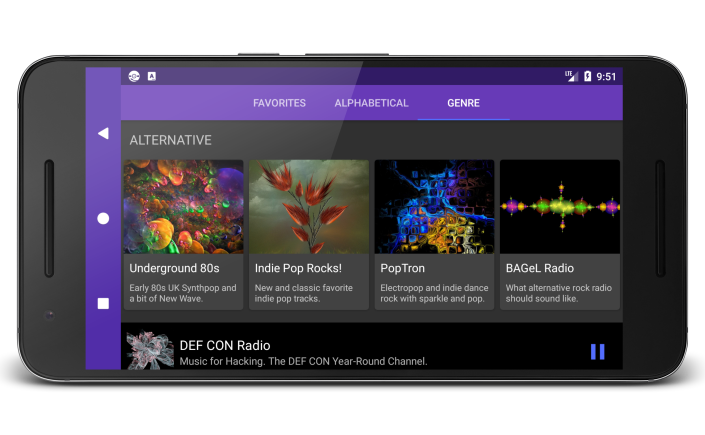
I recently launched a new Android app and this post consists entirely of shameless advertising and click-bait. You have been warned. What's it all about? Well, I'm a big fan of Soma.FM for years. They've had a mediocre Android app but axed it several years ago. Unsatisfied with the situation I decided to fire up … Continue reading Alpha+ Player – Unofficial player for Soma FM
Chrome Custom Tabs for Android
Working with Custom Tabs isn’t exactly straightforward. Even minimal examples involve quite a bit of code as can be seen in the Official Chrome Custom Tabs documentation. What makes it worse is that one can’t expect Chrome to be available on any device. That means additional code to fall back to good old WebView. To … Continue reading Chrome Custom Tabs for Android
Android Playlist File Parser
For an upcoming Android App project of mine I had to parse PLS (or just Playlist) files. I decided to make this a generic Android library ready for re-use. It's braindead simple to use: // ... Playlist playlist = PlaylistParser.parse(inputStream); for (Playlist.Track track : playlist.getTracks()) { track.getFile(); track.getTitle(); // ... } Based on an InputStream … Continue reading Android Playlist File Parser
Celestron Firmware Manager on Linux
To update the hand control or motor controller firmware on any of your Celestron mounts, you will need the Celestron Firmware Manager. The whole process is explained on this website. Long story short, you have to download the software here: http://software.celestron.com/updates/?dir=CFM/CFM After unzipping you end up with CFM.jar. To be able to run that you … Continue reading Celestron Firmware Manager on Linux
Disk space for Windows developers
While I gladly finished my Windows development detour a while ago, it can't hurt to share some stuff. It always puzzled me how fast gigabytes of disk space disappear through ordinary Windows usage as a developer. So here's my non-exhaustive list of places to reclaim disk space: Temp folders Windows has plenty of them. In … Continue reading Disk space for Windows developers
Lync on Mac / Linux
Some of us have to work in a Windows environment at work. Often enough, people use Microsoft Lync to communicate. It is available for other platforms but that doesn't make it any better. On Mac OS, the most viable instant messenger (IM) option is Adium. It turns out there is a SIPE plugin available for … Continue reading Lync on Mac / Linux
Fixing Steam on Linux OpenGL GLX warning
In some cases, Steam on Linux greets your with an error dialog stating: OpenGL GLX context is not using direct rendering, which may cause performance problems This is because Steam ships copies of several system libraries which may interfere with other libraries on your system that it doesn't replace. This can easily be fixed. Just … Continue reading Fixing Steam on Linux OpenGL GLX warning
 Sascha Peilicke
You must be logged in to post a comment.